In order to see your 'My Profile' page on Asda Stars, please use the following steps to access it directly:
- After you login to your 'Asda Stars' account you will be presented with a Burger Icon on the top right of your main menu site.

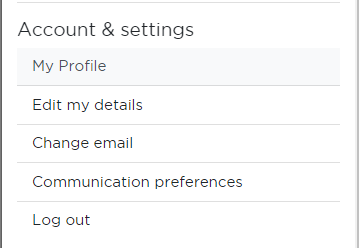
- Click on the Burger Icon and it will automatically show you a drop down menu, which you can see in the image below.
- After seeing all the options, depending on your account you will see a section called 'Account & Settings'
- Within this section you will have the 'My Profile' option - click here to access your profile page.
From there you will be able to see your recognitions from your colleagues and any information that is directed towards you or your team.
Was this article helpful?
That’s Great!
Thank you for your feedback
Sorry! We couldn't be helpful
Thank you for your feedback
Feedback sent
We appreciate your effort and will try to fix the article