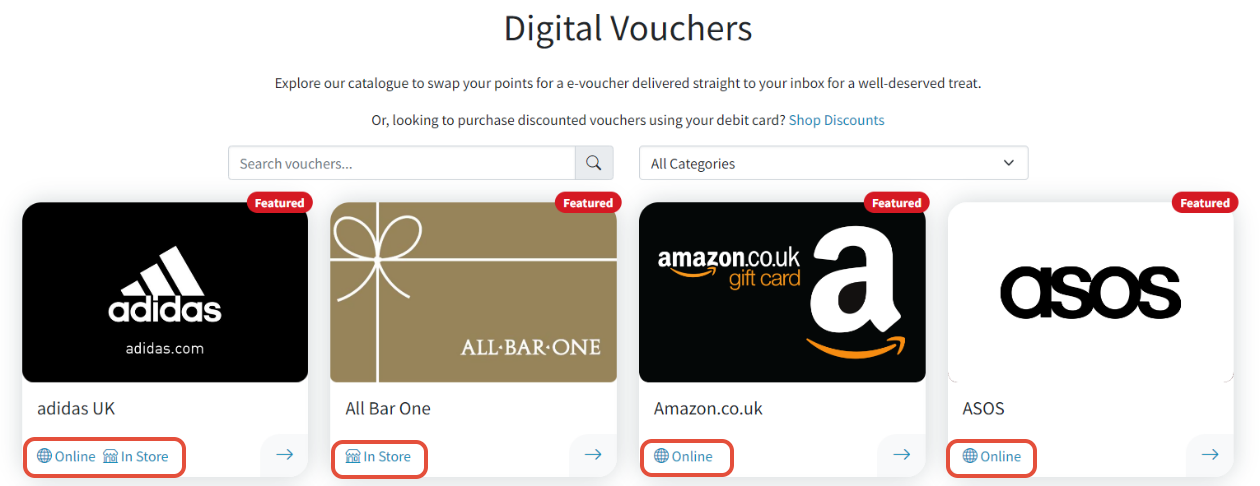
Before choosing a voucher, you’ll see icons beneath each option indicating where it can be spent - such as online, in-store, or both.
This allows you to easily check if the voucher matches how you plan to use it.
Here’s how to check where and how the voucher can be used:
- Before selecting a voucher, take a moment to check the icons displayed beneath each voucher. These icons indicate whether the e-Code can be used online, in-store, or both — helping you choose the right option for your needs.
- Once you’ve found a voucher that suits your needs, click on the voucher tile to view more details specific to the retailer — including how to redeem it. Be sure to review this information before adding the voucher to your basket.
Always check the terms provided, as the redemption process may differ slightly between suppliers.
Was this article helpful?
That’s Great!
Thank you for your feedback
Sorry! We couldn't be helpful
Thank you for your feedback
Feedback sent
We appreciate your effort and will try to fix the article